
Motivation
Looking at my favorite brands and developers, almost all work in headless architectures—and as both a developer and consumer, I can feel the difference. I chose to go An architecture where the frontend is decoupled from the backend or CMS, giving full design and performance freedom.headless with Next.js, Sanity and Shopify. These are the core technologies used by the e-commerce agencies I'm targeting, and the documentation was solid enough to learn from. I had no prior experience with this architecture, but my curiosity was too strong not to pursue it.
Running has been a huge part of my life, and I wanted to build something in that world—not as a side project, but as a real architectural challenge. Something that reflects modern e-commerce in today's landscape of storytelling and editorial content.
Architecture & Decisions
The core challenge that consumed a lot of time was 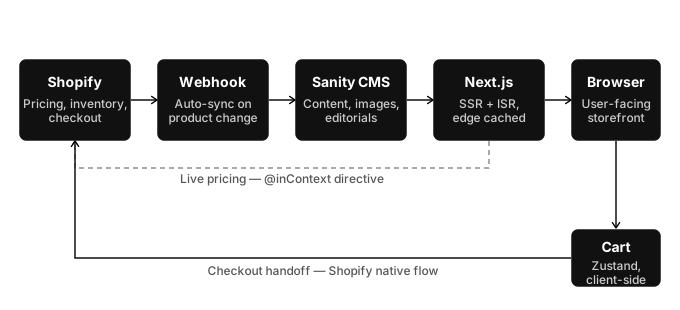 deciding what lives where. I regularly changed perspectives—thinking as a developer, as an e-commerce team member, and as a stakeholder—to get a good understanding of the workflows from each side.
I decided to keep Shopify lean and use it as a base for all data. Shopify owns pricing, inventory and checkout while Sanity owns all product content, images, editorials, categories and brands. A An automated alert one app sends to another when something happens—like 'new product added.'webhook between the systems keeps them always synchronized—when a product is added in Shopify, it automatically syncs to Sanity within seconds. No manual entry needed.
I kept the cart and checkout as simple as possible—Zustand handles client-side state for instant UI updates, while Shopify's native checkout flow manages payment, shipping, and order processing.
Nothing is hardcoded—changes take seconds, not days. Workflows stay consistent and efficient. I wanted to create a workspace where the website feels like a living organism that's constantly evolving with the season.
With Sanity Live Editing, the team can see changes in real time. The homepage is changeable with just a few clicks and can be scheduled like a release with a specific date and time. Collection and brand pages have an editorial section that can be used to tell a story visually on the PLPs—showing different types of imagery to showcase a product, each linked directly to the product page.
The site supports 23 countries across 3 market regions. Every product page fetches country-specific pricing through Shopify's @incontext directive — a customer in Denmark sees DKK and a customer in Germany sees EUR, pulled directly from Shopify's market configuration. Switching countries updates the URL, invalidates the cart (because line items are currency-bound), and preserves the user's position on the page.
Performance
One of the biggest reasons I chose to go headless—performance. I was incredibly curious about how you optimize a scalable e-commerce site that sells products globally with this tech stack. I wanted the website to feel fluid, user friendly and as fast and responsive as possible.
Constantly checking Google's tool that measures how fast your site loads and gives you a score out of 100.PageSpeed and Vercel Speed Insights for red numbers, I used that as a metric to see if my decisions made a positive impact or not.
I managed to get the project from a score of aprox 50 out of 100, to almost perfect scores on both mobile and desktop—here's how:
Images
Every image is served at the right size for the device, loads with a blur placeholder while the full version arrives, and prioritizes the first thing the user sees. The browser serves 512px images instead of 828px—4x less wasted data.
Streaming
Instead of waiting for everything to load before showing the page, content appears as it's ready. The hero renders instantly while product grids stream in behind it. This cut page load from 4.5s to 2.3s on brand pages. 13 components are dynamically imported so they only load when triggered—the cart drawer, mobile menu, search modal, and focus-lock library never touch the initial bundle.
Zero-JS product cards
CSS replaced JavaScript on 28+ product cards per listing page. Hover effects, gallery swiping, size previews—all pure CSS. Zero hydration cost per card.
Lean data
Early on, every page fetched the full product document—description, variants, editorial images, everything. Listing pages with 28+ products were transferring massive payloads. I built three tiers of Requests only the data you need from the database instead of fetching everything.GROQ projections: a full one for product pages, a lean one for listing pages, and a minimal one for carousels and homepage grids. That single change cut data transfer by 60-80%.
Caching
Pages are statically generated at build time and served from the Servers located close to users worldwide that cache and deliver content faster than a single central server.CDN edge globally. Users get static-site speed, but the content stays dynamic. When someone on the e-commerce team updates a product in Sanity—changes a description, swaps an image, adjusts a category—a revalidation webhook fires and only that specific page is rebuilt. The other 200+ pages keep serving from cache, untouched. Images are cached for 31 days at the edge, and each page knows exactly which tags to invalidate so stale content never lingers. Static performance, living content.
Accessibility
Running and e-commerce both thrive on inclusivity. Accessibility wasn't part of my workflow from the start, but I quickly realized it needs to be implemented when I'm building components and structuring the website. Treating it as something you add at the end means you're constantly retrofitting decisions that should have been made earlier.
When it's done right, it improves the experience for everyone—and when it's done wrong, it excludes people entirely.
Keyboard navigation works everywhere—every button, link and modal is reachable without a mouse. Modals are built correctly: when the cart opens, focus stays trapped inside and the rest of the page becomes inert. Most sites skip one of these; we do both.
Screen readers get the same quality experience. Every page has the correct Tells the browser what language the page is in so screen readers pronounce words correctly.lang attribute for its locale, search results are announced live as they update, and collapsed content is hidden from the accessibility tree so it's not read aloud. Every clickable element uses semantic HTML—no fake buttons or div-based links. All tap targets are at least 44x44px, meeting Web accessibility guidelines—AA is the standard most sites aim for to be legally compliant.WCAG 2.1 AA standards.
Testing
The components that generate revenue — product pages, cart, checkout — are the most important to protect. Not just the components themselves, but the information they display: price, currency, variants, availability. If any of that is wrong or fails silently, the customer either sees something broken or loses trust. Testing exists to protect the money.
54 Vitest unit tests covering currency formatting across 4 locale
combinations, cart store operations, and locale detection — the logic that
can't afford to break. These run in milliseconds as part of the A system that automatically runs checks (tests, linting) on every code push and handles deployment to production.CI/CD pipeline — every push and every deploy goes through the same checks before reaching production.
End-to-end tests with Playwright cover the flows that actually generate revenue — navigating to a product, selecting a variant, adding to cart, and verifying the cart modal shows the right item at the right price. Every test uses accessibility-first selectors — aria-label, role="dialog", role="combobox" — so the tests break if the accessibility breaks.
Same as accessibility, I learned that testing should be part of the workflow from the start. I added it later and it cost me hours reproducing and solving bugs that a test would have caught immediately. Instead of fixing leaks, prevent them in the first place.
In production, I'd add Sentry for error tracking and session replay — catching failures that tests can't simulate, like network timeouts and edge-case browser behavior.
SEO & Discoverability
What people can't find, they can't buy. SEO makes a huge difference in the organic funnel and for this project, I focused on getting the fundamentals right from day one.
Using Next.js 16's generateMetadata function, every page gets the correct dynamic metadata—titles, descriptions, Open Graph images—all generated on the server with zero client-side JavaScript.
Rich snippets using A structured data format that helps search engines understand your page content—like price, availability, and ratings.JSON-LD convert better than regular search links. Product pages show price, availability and ratings directly in Google results. Breadcrumbs appear as navigable links in search. This is in place for 400+ products.
Global websites need localized URLs and proper language tags. The site supports 23 countries across 3 market regions, each with their own URL structure and HTML tags that tell search engines which language and region a page targets, so the right version is shown to the right audience.hreflang tags—so Google knows which version to show to which audience.
A dynamic sitemap covers every product, collection, brand, blog post and category path. The SEO infrastructure is built so every new product is discoverable from the moment it's published.
Retrospective
Even though it was a massive challenge diving into a headless project, I managed to navigate learning Next.js, Sanity, and Shopify simultaneously. From a project perspective: getting the performance to a quality I'm satisfied with, making the entire website accessible, and setting up a workspace and workflows that can scale.
But the real win wasn't the project—it was what I learned about myself as a developer. I'm leaving with a big checklist of lessons: how to adjust my workflow, what to implement from day one, and patterns I'll reuse on every future project.
What I've learned:
Planning and building need equal time and care. I'd start with a full design system in Figma before writing a line of code—typography, spacing, components, all mapped out. It would've saved days of iteration. And not being obsessed over PageSpeed—the numbers matter, but the experience matters more. Real data and user feedback beat a perfect score.
As a developer, I've learned I need workflows that help me plan my days and structure my thinking so I can communicate clearly with future team members. This project required a lot of big and small decisions, and I learned that simple solutions usually work best—complexity for the sake of complexity doesn't serve the user. Making the big decisions early prevents decision fatigue mid-project.
Having gone through all the friction, I'm excited to use this project as a template for upcoming headless builds.
